
Fraud prevention 🛡️
Preventing fraud is crucial for your organization and Ethnio, but especially in the world of participant incentives. Not only do we not like survey fakers and professional scammers, but those people in your research studies can cause serious problems with quality findings.
Fraud prevention deep dive 🤿
For a more in-depth outline of how Ethnio approaches fraud prevention, we have a pretty detailed blog post on tips and tricks and all the measures we have in place.
📖 Read all about Ethnio's multi-layered fraud prevention and strategies →
Here's how we tackle fraud prevention effectively, and account owners or admins can head to account › fraud prevention to control the options.
- Study responses
- Pool
- Incentives
Study responses
If one or more of your responses are flagged as suspicious, a new column will appear AFTER a suspicious response is flagged called Fraud Suspicion and individual rows will have a tag called ⚠️ Suspicious.
A response is flagged when Ethnio sees the same device fingerprint on more than one response in that study. The earliest response from a device is never flagged — only the ones that follow it.

Under Account → Fraud Prevention → Flag suspicious responses there's a checkbox that controls how strict the device check is. It's checked by default.
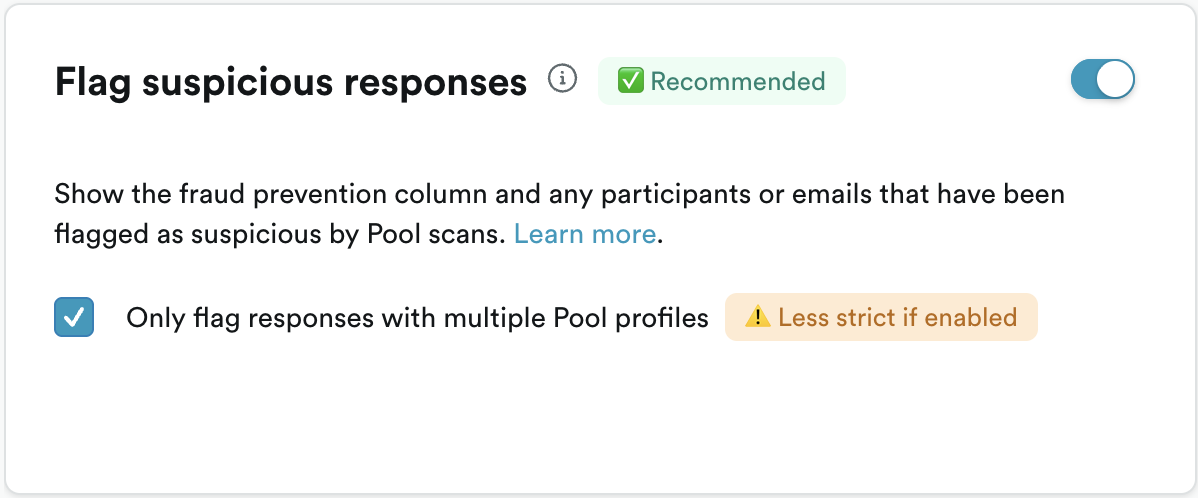
Unchecked (default)
Repeat responses from the same device are flagged and does not check Pool at all. Any participant re-taking the study on the same device gets a ⚠️ Suspicious tag on every response after the first. This setting works on all plans in Ethnio, and does not require Pool.
Checked (less strict)
A repeat response is only flagged when the shared device was used by two or more different Pool profiles. One person taking your study twice from the same device is not flagged. This requires an Enterprise plan with Pool.
What you'll see in Responses
This is an example:

Pool
If the account owner or admins have enabled this option, a scan will run once per day automatically and you can see the results in Pool › Fraud queue. The scan uses IP addresses, fingerprints, and shared emails as well as payment emails to identify participants that appear suspicious from an incentive standpoint. In other words, if people seem to be manipulating your research to get via multiple emails they might appear in the fraud queue.
📧 The most common reason for suspicious flag: shared emails
If you've paid someone with an email like bob@a.com but they've redeemed reward using a different email like bobsrealemail@gmail.com , and that email is in turn associated with more than three other emails, that's a bad sign. That typically is a signal that someone has one email for receiving payments but is generating more than three other fake emails to qualify for multiple studies across all Ethnio customers and our network of incentive providers.
More detail below 👇
Understanding Fraud in Participant Incentives
Fraud in incentive programs can take many forms, including:
- Fake Participants: Individuals creating multiple accounts to claim incentives.
- Identity Theft: Using stolen email addresses or identities to participate in multiple studies.
- Inaccurate Information: Providing false information to qualify for studies.
Incentives
Ethnio checks every reward automatically when the recipient redeems it. If anything about the redemption looks suspicious, the reward is held instead of paid out, and it lands in the fraud queue at Incentives › Activity › Fraud queue.
Nothing is paid out while a reward sits in the queue. A person on your team decides whether to release it or block it. Incentive fraud checks are always on for global financial and security compliance, so they can't be turned off under Account › Fraud prevention.
What triggers a suspicious tag on incentives
Every redemption goes through these checks:
| Check | What it catches |
|---|---|
| Many emails on one device or payout account | The same device or payout account (such as a bank account) used with several different recipient emails. This is the most common reason a reward is held. |
| Previously blocked recipients | Someone your team blocked before tries to redeem again, even with a new email, IP address or device. |
| Known fraud records | An email, phone number, IP address, device or bank account that matches known fraud across millions of payouts in our incentive network. |
| Blocked countries, IP addresses, emails or domains | A redemption that comes from a blocked location, IP address, email address or email domain. |
| Reward limits | A recipient who has redeemed more rewards, or a larger total amount, than the limit allows. |
An example of the most common case: a participant redeems a reward as bob@a.com, then redeems more rewards from the same laptop as bob.smith@gmail.com, robert.s@yahoo.com and a few other addresses. Each new email looks like a new person, but they all share one device, so the next redemption is held. That pattern usually means one person is collecting rewards under made-up identities.
Risk level and reasons
The Fraud rule column in the queue shows how risky a held reward looks: Low risk, Medium risk or High risk. When you click Release or Block, the confirmation shows the risk level again, along with the reasons the reward was held. These are the reasons you'll see most often:
| Reason | What it means |
|---|---|
| Device or account used with multiple email addresses | The same device or payout account has been used with several different recipient emails. |
| Device linked to a previously blocked reward | The recipient redeemed from a device your team has already blocked a reward on. |
| Email address linked to a previously blocked reward | The recipient's email was used on a reward your team blocked before. |
| Email address matches a known fraud record | The email has been tied to fraud elsewhere in our incentive network. |
| IP address matches a known fraud record | The IP address has been tied to fraud elsewhere in our incentive network. |
| Exceeds the reward count limit | The recipient has redeemed more rewards than the limit allows. |
The Incentives Fraud Queue
Held rewards go into a special fraud queue at Incentives › Activity › Fraud queue. The queue has three tabs, and each reward moves through them as you work:
- Flagged holds rewards waiting on a decision, marked ⚠️ Suspicious. Start here.
- Blocked holds rewards your team blocked.
- Released holds rewards your team released and paid out to the recipient.
Each row shows the date, status, order ID and mode, the recipient's name and payment email, the amount, and the risk level. To find a reward, search by order ID, name or email. This helps when a participant writes in asking where their reward went. If the Flagged tab is empty, nothing is waiting on you.
Releasing or blocking a reward
Each reward in the Flagged tab has two actions:
- Release pays the reward to the recipient as normal.
- Block cancels the reward, and the recipient is never paid. The response also shows a Blocked status in Responses, and future redemptions from the same person are flagged automatically.
Both decisions are final. A blocked reward can't be released later, resent or reissued.
A flag is a signal, not a verdict. Release the reward when you have your own reason to trust the person, such as a participant you recruited directly, a known employee or customer, or someone who shares a household device with another participant. Block it when the recipient doesn't match anyone you expected in the study, or when the session itself looked rehearsed or inattentive. If you're unsure, check the response or session behind the reward before deciding. The reward stays held until someone decides, so there's no rush.
Criteria for flagging participants as suspicious
Across all types of fraud detection, these are all the elements that go into marking a participant as suspicious:
- IP Address Tracking: We monitor IP addresses to detect and block multiple registrations from the same source.
- Device Fingerprinting: This technology helps identify unique devices, preventing multiple sign-ups from the same device.
- Network check: Ethnio checks with incentive providers and their customers to see if there's a history of fraud for any given email, IP, or device
- Shared or blocked emails: Any email that has been used as a secondary payment method email in multiple accounts will be flagged as suspicious.